


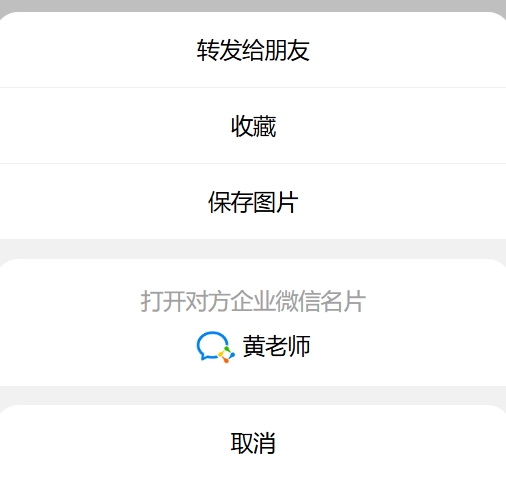
用到 jquery库
html
<!DOCTYPE html>
<html>

<head>
    <meta charset="UTF-8">
    <meta name="viewport" content="width=device-width, initial-scale=1.0">
    <title>仿微信弹框</title>
    <link rel="stylesheet" href="Css/tk.css">
    <script src="js/jquery.min.js"></script>
</head>

<body>
    <button class="clickme" style="width: 210px;font-size:18px">点击添加老师</button>
    <div id="hdf_plug22">
        <div id="hdf_plug22_alert">
            <div>
                <p>转发给朋友</p>
                <p>收藏</p>
                <p>保存图片</p>
            </div>
            <div id="hdf_plug22_open" class="zaax-click">
                <p> 打开对方企业微信名片</p>
                <p style="color: #000;">
                    <img src="Picture/qywx.png">
                    黄老师
                </p>
            </div>
            <div>
                <p class="hdf_plug22_close">取消</p>
            </div>
        </div>
    </div>
    <script src="js/index.js"></script>
</body>

</html>
css
#hdf_plug22 {
    z-index: auto;
    margin: 0;
    padding: 0;
    width: 100%;
    height: 100%;
    background: rgba(44, 44, 44, 0.3);
    position: fixed;
    top: 0;
    left: 0;
    font-size: 16px;
    opacity: 1;
    display: none;
  }

  #hdf_plug22_alert {
    padding: 0;
    height: auto;
    position: absolute;
    width: 100%;
    margin: 0;
    box-sizing: content-box;
    background: rgb(241, 241, 241);
    border-radius: 20px 20px 0px 0px;
    bottom: 0;
    opacity: 1;
    transition: opacity 0.5s ease-in-out;
  }

  #hdf_plug22_alert div {
    background: white;
    border-radius: 20px 20px 0 0;
  }

  #hdf_plug22_alert p {
    width: 100%;
    text-indent: 0;
    margin: 0;
    padding: 0;
    text-align: center;
    line-height: 60px;
    height: 60px;
    border-bottom: 1px solid #F1F1F1;
    color: black;
    font-size: 18px;
  }

  #hdf_plug22_open {
    margin: 15px  0;
    padding: 15px 0;
    background: white;
    height: auto;
    width: 100%;
    border-radius: 0;
    text-align: center;
  }

  #hdf_plug22_open p {
    width: 100%;
    text-align: center;
    text-indent: 0;
    margin: 0;
    padding: 0;
    height: 36px;
    line-height: 36px;
    color: #a1a1a1;
    font-size: 18px;
    border-bottom: none;
  }

  #hdf_plug22_open p img {
    width: 32px;
    height: auto;
    vertical-align: middle;
  }

  #hdf_plug22_close {
    /* z-index: 9999; */
    width: 100%;
    text-align: center;
    text-indent: 0;
    margin: 0;
    padding: 0;
    cursor: pointer;
    line-height: 60px;
    color: black;
    font-size: 18px;
  }
js
$(function () {
    $(".clickme").click(function (){
        $("#hdf_plug22").show()
    })
    $(".hdf_plug22_close").click(function (){
        $("#hdf_plug22").hide()
    })
})
1111